


Managing Tenant Repair Requests: How to Choose the Right Software
A repair request isn’t resolved when it reaches an inbox. An urgent leak reported by text, a boiler fault buried in an email and a routine repair on a spreadsheet can leave everyone unsure who owns the next step. Managing tenant repair requests means bringing reports into a clear process, so the team can assess each issue and tenants know what’s happening.
The right system depends on how your team receives requests, prioritises jobs, shares updates and records outcomes. Compare software by testing whether it supports those steps, from logging the issue to assigning the repair and keeping a useful record. A clear process matters as much as the software itself.
Software organises requests, but people still need to carry out the repair. PlumbTech365 Property Services, trading as Premier Property Solutions (SE) Ltd, supports landlords, letting agents and management companies with property repairs, plumbing and heating. The company is 100% Gas Safe Registered and holds £5 million public liability insurance. Dedicated account management, a single point of contact and photographed job reports help connect organised records with repair delivery.
Table of Contents
Why managing tenant repair requests needs more than an inbox
Map the tenant repair request workflow before comparing software
Compare tenant maintenance software by workflow, not feature count
Introduce repair request software without disrupting the team
Connect organised tenant requests with dependable property repairs
Why managing tenant repair requests needs more than an inbox
A repair can arrive by phone, text message or email while the team is handling other work. If each channel has its own record, a fault may be noted in one person’s inbox while the follow-up sits with someone else. The problem is not just the volume of messages. Without clear ownership, a priority and a current status, it’s hard to tell who should act next.
Managing tenant repair requests needs a record that can be followed from the first report through to close-out. Request-tracking software can bring the details, responsibility and progress into one organised view. It doesn’t carry out the repair. Someone still needs to assess the issue, arrange the work and record what happened. A useful process connects those tasks rather than treating a digital record as the finished job.
For wider context on the responsibilities involved in property management, see this property management overview.
This video offers a related perspective on handling tenant repair requests:
Which tenant repair requests need tracking?
Keep routine repairs, planned maintenance and urgent property issues visible in a consistent record, while distinguishing their priorities. A loose cupboard door may be routine; a heating fault or significant leak may need prompt assessment. The first entry should identify the property, the affected room or item, what the tenant has noticed and when they reported it. This gives the person reviewing the request enough context to decide what happens next.
What breaks when requests are handled informally?
Responsibility can disappear between channels. A message may be missed when someone is away, or two colleagues may each assume the other has replied. Duplicate reports can make one repair look like two separate jobs, leaving conflicting progress notes. Give tenants a clear route to report a problem and share new details, then keep those updates with the original record so staff can follow the same history.
A consistent record also helps teams see whether a fault has come up before at the same property. If a tenant reports a recurring issue, staff can review earlier notes and completion records before deciding what information to pass on. That context helps distinguish a repeat problem from a new one and gives the person coordinating the next action a fuller picture.
Keep responsibility visible at each stage. Record who is expected to review the issue, what action is outstanding and whether the tenant has been updated. A clear close-out should show what was done and whether further work remains. A request shouldn’t appear resolved simply because someone has moved an email or changed a status.
Map the tenant repair request workflow before comparing software
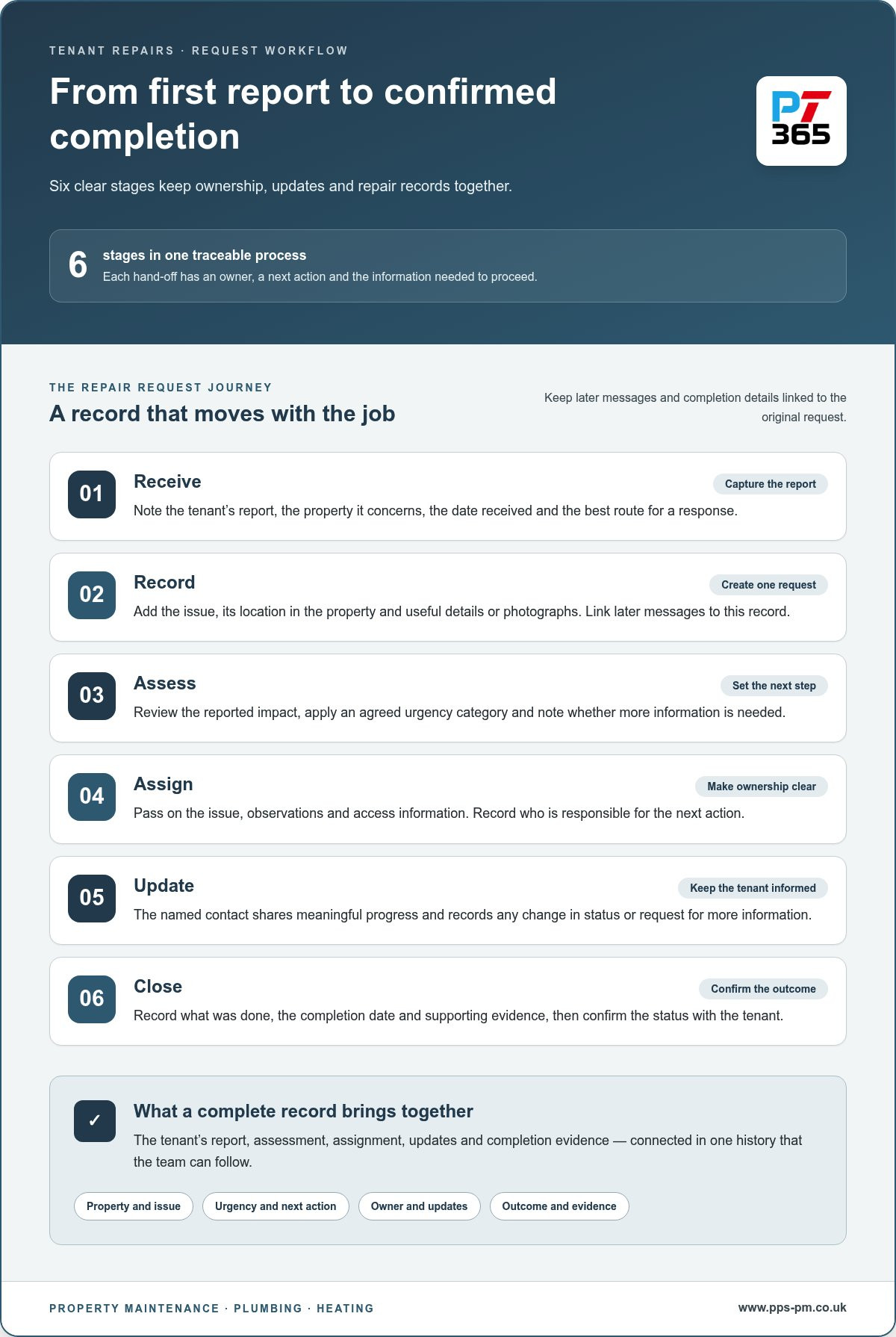
Before choosing a system, decide how a repair moves from first contact to confirmed completion. Each hand-off needs a named owner, a next action and enough information for the next person to proceed without searching through separate messages. Use this process map to judge whether software fits your team. MIT’s discussion of property technology in real estate offers wider context for the role digital tools can play in property work.
Receive: The person taking the call or reviewing the message captures the tenant’s report and confirms which property it concerns. Record the date received and the best route for a response.
Record: The administrator creates one request record, adding the reported issue, its location within the property and any useful description or photographs. Link later messages to this record.
Assess: The responsible property team member reviews the reported impact, applies an agreed urgency category and notes whether more information is needed before work can be assigned.
Assign: The person coordinating repairs allocates the job and passes on the issue details, access information and relevant observations. Record who is responsible for the next action.
Update: The named contact tells the tenant what is happening and records meaningful progress, such as a change in status or a request for further information.
Close: The person overseeing the job records the repair outcome, completion date and any supporting evidence, then confirms the status with the tenant.
What information should a tenant repair report capture?
Start with the property reference, the tenant’s description of the issue, the date received and their preferred contact route. Ask clear prompts, such as which room is affected and what has changed, rather than relying on a vague label like “heating problem”. Photos can help explain visible damage or show where the fault is, when appropriate. Keep personal details relevant to arranging and tracking the repair.
How should teams assess urgency and assign work?
Agree categories that help staff distinguish urgent issues from routine work, then make one person accountable for reviewing each request and deciding its next step. Categories support consistent judgement, but shouldn’t replace it. Assignment notes should tell the repairer what the tenant reported, where the issue is, what has already been observed and any access details needed to plan the visit.
A complete repair-request record connects the tenant’s report, assessment, assignment, updates and completion evidence in one traceable history. Keep tenant communication and repair evidence as separate parts of the record: one shows how progress was shared, the other documents the work outcome. This makes close-out clearer and gives the team a useful history if the issue needs further attention.
Once the workflow is clear, assess how a property maintenance partner can work alongside it. Property maintenance support can form part of a practical route from logged request to repair delivery.
Compare tenant maintenance software by workflow, not feature count
A long feature list won’t tell you whether a system supports the hand-offs your team relies on. Compare how each approach records a request, shows its status, identifies who owns the next action and retains the job history. The right fit for managing tenant repair requests depends on your portfolio, who handles each stage and which property systems your team already uses.
Property management software or a dedicated maintenance system?
Broader property management software can place repairs within a wider record of properties and tenancy activity. A maintenance-focused system centres on repair handling, but may not hold the wider property context. Neither category guarantees a particular function. Review how each option identifies the responsible person, keeps a job’s history together and lets staff find the record again. Where possible, compare these points with the workflow already in use.
Which comparison criteria matter in day-to-day use?
Assess the steps staff and tenants will actually use. Mobile access may matter to staff working away from a desk; tenant communication, clear status tracking and evidence storage matter if updates or completion records are hard to find. Reporting and integration also deserve attention: does the system fit how your team reviews open work and passes details into existing property records? Treat each function as something to test, not an assumption about every platform.
Essential: A clear request record, visible ownership, usable status updates and a way to retain job notes and completion evidence.
Workflow-dependent: Mobile access, tenant-facing updates, reporting and links with existing property systems, where these solve a documented need.
Optional: Extra functions that don’t address a current hand-off or information gap.
Score each approach against the essential needs first. Consider optional functions only if they make the process clearer without adding avoidable steps. A simple workflow your team follows can be more useful than a larger system that doesn’t match how requests move from report to repair.
Introduce repair request software without disrupting the team
A new system can add confusion if it’s configured before the team understands its current process. First, map how a request arrives, who reviews it, how work is assigned, where updates are recorded and what counts as closed. Note where information is re-entered or responsibility becomes unclear. Use this map to shape the setup, rather than asking staff to adapt to categories that don’t reflect their work.
Introduce the process in manageable stages. Agree the categories, responsibilities and records first, then pilot the workflow with a defined group of properties. During the pilot, ask staff and tenants where instructions are unclear, and review requests that stalled or needed repeated follow-up. Use what you learn to adjust the process before wider adoption. The aim is a workflow people can follow consistently.
How can teams prepare request categories and responsibilities?
Use plain-language categories that tenants can recognise and staff can apply consistently. A label such as “heating issue” is clearer than an internal code, but the report should still capture useful detail about what has stopped working. Keep urgent escalation instructions separate from routine requests so a serious report isn’t left in the standard queue.
Name an owner for each hand-off. Decide who reviews new reports, assesses priority, assigns the repair, updates the tenant and confirms closure. If one person covers several tasks, make that clear too. Record the next action and the person responsible in the job record; don’t rely on team memory or an unassigned shared inbox.
How should teams review completed repairs?
Check that the final record connects the original report to the work carried out. It should explain the reported issue, note the action taken and show whether the repair is complete or needs further attention. Add photographs or a job report where available, and store them with the relevant property record. This gives colleagues useful context if the tenant raises a related issue later.
Keep safety documentation distinct from general repair notes. For gas work, retain the appropriate record for the work and property; the landlord gas safety certificate guide provides relevant context on gas safety records. Don’t treat a software status such as “closed” as proof that every required document has been filed.
After the pilot, review a sample of closed jobs with the team. Look for missing updates, unclear ownership, incomplete notes or evidence saved outside the property record. Ask users which steps felt repetitive and where they had to switch channels to find information. Refine the workflow, explain any changes and keep a record of the agreed process so new team members can follow it.
For repair delivery that fits an organised property workflow, explore property repair support from PlumbTech365.
Connect organised tenant requests with dependable property repairs
Request software can organise information, but it doesn’t complete the repair. Landlords, letting agents and management companies still need a clear route from an assessed job to practical work at the property. We are a trusted property Maintenance company providing reliable, high-quality services across London and Kent. supports reactive and planned property maintenance as a delivery partner, not as a software vendor.
What does a maintenance partner add to the request workflow?
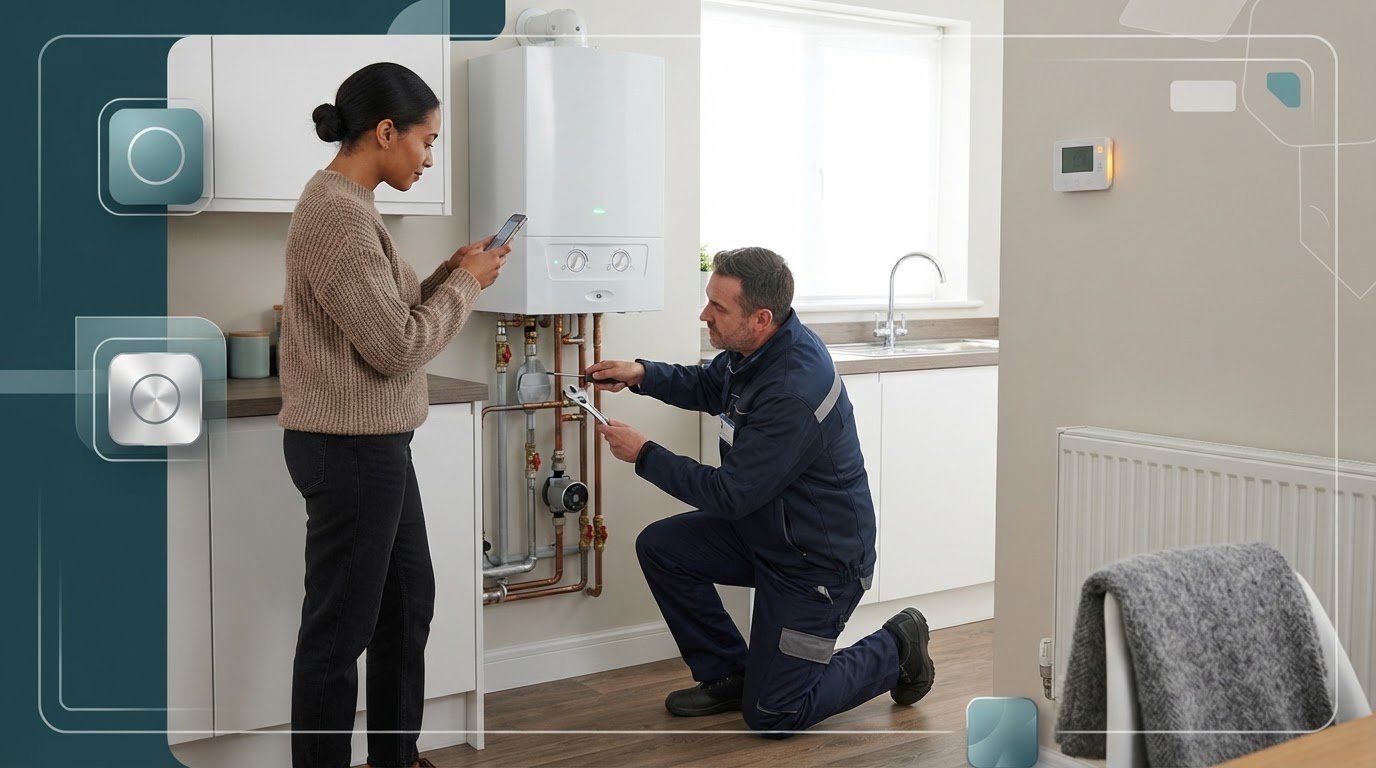
A maintenance partner can work within the process your team has mapped. Dedicated account management and a single point of contact give landlords and letting agents a clear route for coordinating repair work. Integration with property management systems helps connect job activity with existing property records, so information can follow the repair from request to delivery when managing tenant repair requests.
For plumbing repair requests, pass on the reported fault, property details and relevant access information so the job can be coordinated with useful context. We are a trusted property Maintenance company providing reliable, high-quality services across London and Kent. provides plumbing repair services alongside wider property maintenance. Detailed job reports with photographs give property teams a record of the work carried out to retain with the relevant job history.
That documentation helps teams understand what happened after a job is marked complete. Staff can refer to the reported issue and the recorded work, rather than relying on a status label alone. For gas-related work, keep the relevant records alongside the property’s other maintenance information.
How can property teams take the next step?
Before arranging support, outline how your team receives requests, assesses them, assigns repairs and records completed work. Identify what information a maintenance partner needs and how updates should return to your team. This gives everyone a practical starting point for fitting repair delivery into your property workflow.
We are a trusted property Maintenance company providing reliable, high-quality services across London and Kent. supports landlords, letting agents and management companies with planned and reactive property maintenance. Discuss the types of repairs you manage and how your team records jobs. Dedicated account management, a single contact and property system integration can help align repair delivery with your existing process.
To discuss property maintenance support, call 01322 252015 or 01322 251520, or email info@plumbtech365.co.uk. You can also get in touch about property maintenance support.
Make your next repair workflow easier to deliver
Choose a system your team can keep current, then use its records to spot where requests still stall. As your process settles, review whether tenants know how to share updates and whether each completed job leaves a clear record for the property team. Regular reviews can keep the workflow useful as your portfolio and maintenance needs change.
Software is only one part of repair management. The people coordinating and completing the work matter too. PlumbTech365 brings 30+ years of experience in property maintenance, helping connect organised requests with practical repair delivery.
Give your repair process a clear next step. Explore property maintenance support and build a route from tenant report to completed work.
Frequently Asked Questions
What is the best software for managing tenant repair requests?
The best option is the one your team can use consistently from first report to repair completion. To compare choices, test a typical request, such as a faulty door lock: can staff find the property, identify the person responsible, see the latest update and locate the final job note? Include the people who handle repairs in the assessment. Their everyday tasks will show whether a system fits better than a feature list alone.
Can property management software track tenant repairs?
Some property management platforms can track repairs, but available functions vary. Before relying on one, test how it handles a request that changes, for example, when a tenant adds a detail after the job has been logged. Can staff find that update alongside the original report, and can they tell whether it has been acted on? Also review how closed job records can be retrieved by property.
How should landlords prioritise tenant repair requests?
Assess the effect of the issue on the tenant and the property, then follow your team’s agreed escalation process. A report of a loose cupboard hinge differs from a fault affecting heating or water, so ask focused questions about what is affected and whether the situation has changed. Record the reason for the priority decision and who made it. If new details alter the picture, review the priority rather than relying on the original label.
Do tenants need an app to report maintenance problems?
No, an app isn’t essential if tenants have a clear, accessible way to report problems. Choose a route that suits your tenants and explain where to send routine reports, what details to include and how they will receive updates. Give urgent issues a clearly signposted route so they aren’t mistaken for routine messages. Before launch, ask a tenant to follow the reporting instructions and flag anything confusing or difficult to use.
What should a tenant repair request form include?
A useful form should help the tenant describe the problem in their own words, rather than forcing them to choose a technical diagnosis. Include prompts for when the issue began, what is affected and whether it has changed. Offer an optional way to attach a photograph if it helps explain the fault. Keep the form easy to complete, and avoid asking for personal details that aren’t needed to assess or arrange the repair.
Can maintenance software arrange the repair as well as record it?
Software can record and organise repair details, but the work still needs to be arranged and completed by people. PlumbTech365 Property Services provides property maintenance support for landlords and letting agents. When passing a job from your system to the maintenance team, include the request reference, the reported fault, relevant access details and any change in priority. Agree how progress information will be shared so your records reflect the job’s status.

Comments